In short: The honest answer is “it depends”. A stock Magento 1 store nobody has touched since 2020 isn’t safe. It carries years of known, unpatched Magento vulnerabilities and sits awkwardly with PCI DSS. But Magento 1 didn’t truly die when Adobe made Magento 1 end of life. The community-maintained OpenMage LTS fork patches it for free, and commercial providers patch it for a fee, so a maintained store can keep trading securely. There are two real paths: stay on Magento 1 but properly maintained. Or, migrate to Magento 2 (free Open Source or paid Adobe Commerce). Maintaining keeps you secure now; migrating is the cleanest long-term answer.
Is Magento 1 still safe to use?
It depends on whether someone is maintaining it. A stock install still running the last official 2020 code is not safe; it carries years of publicly known vulnerabilities with no fixes applied, and it can keep functioning perfectly while being quietly compromised. A store kept current on the community-maintained OpenMage LTS fork, or on a reputable commercial patching service is a different story. The known holes are being closed as they’re found. So the platform name on its own tells you very little. What matters is whether the code has been patched.
What end of life actually meant
When Adobe ended support on 30 June 2020, it stopped releasing the official patches that had previously fixed newly discovered flaws. It pulled Magento 1 downloads and documentation, and cleared Magento 1 extensions from the Marketplace. What it didn’t do was stop the code from working, or stop the people who knew it best from caring about it. Adobe’s exit ended official support; it didn’t end the platform.
The community kept Magento 1 alive
This is the part the scare stories miss. OpenMage LTS is a community-driven fork of Magento Community Edition 1.9, built and maintained by long-standing Magento developers and contributors. It’s free, with no licence fees or subscriptions, and its whole purpose is to keep Magento 1 secure, stable and current. In practice that means:
- Ongoing security patches, with a responsible disclosure process so vulnerabilities can be reported privately and fixed.
- Bug fixes and performance improvements contributed by the wider community.
- Compatibility with modern PHP (7.4 and the 8.x line), which stock Magento 1 was never built for.
- A companion project that preserved thousands of Magento 1 extensions so they aren’t lost now they’re off the Marketplace.
Alongside the free community route, commercial providers such as Mage One offer paid Magento 1 patching for merchants who want a supplier relationship and formal support.
A fair word of caution, because it matters for trust. These patches are reactive, landing after a vulnerability is reported rather than before; they’re tested against common configurations rather than every custom build; and PCI assessors vary in how readily they accept third-party patches as current. Community maintenance is real and valuable; it just isn’t identical to first-party vendor support.
The real risk is an unmaintained store
Unpatched vulnerabilities
Years of known flaws with no fix applied; the most common way these stores are breached
E-skimming / Magecart
Magento 1 stores have been heavily targeted for payment-page skimming attacksMagento 1 stores have been heavily targeted for payment-page skimming attacks
PCI DSS gaps
The standard expects patched, maintained software; an unpatched store struggles to meet it
Abandoned extensions
Third-party modules left unmaintained add their own unpatched holes
No safety net
With no maintenance in place, a break or breach leaves you on your ownWith no maintenance in place, a break or breach leaves you on your own
Apply community or commercial patches and most of these move from unmanaged and dangerous to managed and monitored. Leave the store untouched and they compound every year.
Magento 1 and PCI compliance
PCI DSS expects software that handles cardholder data to be kept patched against known Magento vulnerabilities. An unpatched, unmaintained Magento 1 store struggles to meet that, which can affect your standing with your acquiring bank. A maintained store is on stronger ground. OpenMage LTS explicitly aims to help merchants stay PCI compliant by keeping the code patched. The honest caveat is that because those patches are community-maintained rather than vendor-supported, some assessors treat them more cautiously. So, confirm your position with your QSA or acquirer rather than assuming it. Migrating to a fully supported platform removes the ambiguity altogether.
Our PCI compliance for Magento stores guide covers the wider requirements.
Magento 1 EOL options
Despite how it’s often presented, there aren’t three or four routes here. There are two honest paths, and each has a free and a paid version.
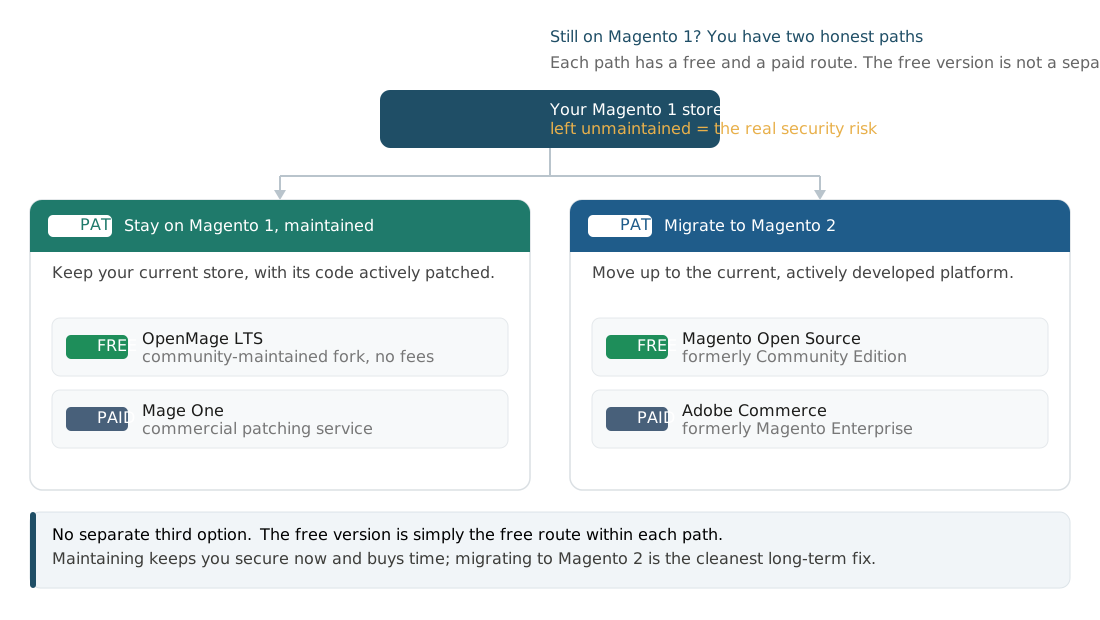
Path 1: Stay on Magento 1, properly maintained
Keep your current store, but make sure its code is actively patched. You can either do this through the free community fork OpenMage LTS or a commercial patching service such as Mage One. This keeps your existing build, extensions and customisations in place while closing vulnerabilities as they emerge. It’s the sensible choice if migration isn’t feasible yet, or if you want to be secure now while you plan the move. The trade-off is that you’re on community or third-party support rather than first-party vendor support.
Path 2: Migrate to Magento 2
Moving to Magento 2 puts you back on an actively developed platform with first-party security updates and a modern architecture. When you migrate, you choose between two editions: Magento Open Source, the free edition (renamed from Magento Community Edition in 2017), or Adobe Commerce, the paid edition (formerly Magento Enterprise) with extra enterprise features and Adobe’s support. It’s a project rather than a patch, but it’s the cleanest long-term answer and the one that settles the end-of-life question for good.
Our guide to Magento 1 to 2 migration covers timeline, cost and what’s involved.
To answer a question we get a lot: the free version, Magento Open Source, isn’t a separate third option. It’s the free edition you land on when you take Path 2, the alternative to paying for Adobe Commerce. The real choice is whether to stay on a maintained Magento 1 or move up to Magento 2; the free-or-paid decision then sits inside whichever path you pick.
What to do now if you’re on Magento 1
- Find out exactly what you’re running. Confirm your Magento 1 version and whether any community or commercial patches are actually applied; a store on stock 2020 code is the urgent case.
- If you’re unpatched, close the gap now. Move to OpenMage LTS or a commercial patcher so you’re not sitting on known vulnerabilities while you decide.
- Get a security check. An audit or scan tells you whether you’ve already been compromised, which on a long-unpatched store is a real possibility.
- Choose your path deliberately. Decide between a maintained Magento 1 and a Magento 2 migration based on budget, timeline and how long you want to stay on the platform.
How Bright can help with your Magento 1 decision
Whether you’re patching what you’ve got or planning a move to Magento 2, this isn’t a decision to make alone. Our team has secured and maintained 100+ stores throughout their careers, with critical security patches typically deployed within 24 to 48 hours of a vulnerability being flagged. So if you’re not sure whether your Magento 1 build is actually protected, we can tell you fast.
For merchants who decide migration’s the right call, we bring over 37 years of combined senior development experience to Magento and Adobe Commerce projects, backed by a 100% zero data loss migration record. We’ve taken stores through complex platform migrations without the downtime or lost orders that put people off making the move in the first place, and our security work has held up under five independent penetration tests, each rated “Strong”.
Whatever stage you’re at, from finding out if you’re already exposed to planning a full Magento 2 migration, we can help you make that call with a clear head instead of a guess.
Key takeaways
- Magento 1 reached end of life on 30 June 2020 and gets no official Adobe patches.
- An unmaintained, stock Magento 1 store is the genuine risk; that’s where the unpatched vulnerabilities and PCI problems sit.
- The community kept the platform alive: OpenMage LTS patches Magento 1 for free, and commercial providers patch it for a fee.
- Those patches are reactive and community or third-party-supported, so they cut risk sharply without being identical to vendor support.
- The two honest paths are a maintained Magento 1 or a move to Magento 2 (free Open Source or paid Adobe Commerce); maintaining buys time, migrating is the long-term fix.
If you’re still on Magento 1, the safest next step is to find out exactly where you stand. A Magento security audit will tell you whether your store is patched, exposed or already compromised, and our migration guide maps the route to Magento 2 when you’re ready.
Frequently asked questions
Is Magento 1 still supported?
Not by Adobe. Official support ended on 30 June 2020, so there are no first-party patches or updates. It is, however, still maintained by the community through the free OpenMage LTS fork, and by commercial patching providers.
Can I still use Magento 1 safely?
Yes, if it’s maintained. A stock store left untouched since 2020 carries years of unpatched vulnerabilities and isn’t safe. A store kept current on OpenMage LTS or a commercial patching service has those vulnerabilities closed as they’re found, which is a very different risk profile.
What is OpenMage LTS?
It’s a free, community-driven fork of Magento Community Edition 1.9 that keeps releasing security patches, bug fixes and improvements, including support for modern PHP versions. It lets merchants run a secure Magento 1 store without Adobe’s official support.
Is Magento 1 PCI compliant?
An unpatched store struggles to meet PCI DSS, which expects patched, maintained software. A patched store, via OpenMage or a commercial service, is on much firmer ground, and OpenMage aims to help merchants stay compliant. Because the patches are community-maintained, confirm acceptance with your QSA or acquiring bank.
What are third-party Magento 1 patches?
They’re security fixes produced outside Adobe to cover vulnerabilities it no longer patches, from the free community OpenMage LTS project to paid commercial providers. They meaningfully reduce risk; they’re reactive and not first-party, so coverage can vary.
Isn’t there a free Magento version I could move to instead?
Yes, and it’s the one many people still call Community Edition. The free edition is now named Magento Open Source (renamed in 2017); the paid edition is Adobe Commerce (formerly Magento Enterprise). Both run on the current Magento 2 platform and both get Adobe’s security patches. So the free version isn’t a separate escape route from Magento 1; it’s the free edition you would choose when you migrate to Magento 2.
Should I migrate from Magento 1?
Migrating to Magento 2 is the cleanest long-term answer, because it puts you back on a first-party-supported platform. But it isn’t the only way to be secure today; a maintained Magento 1 store on OpenMage or a commercial patcher is a legitimate interim position while you plan the move.

WRITTEN BY
Marcin Szterling
Marcin Szterling is a lead Magento developer and Adobe-certified Master Architect with more than ten years of experience on Adobe Commerce and more than 30 years in web development. He specialises in complex multi-store, multi-currency builds and Commerce deployments, with 50+ Magento projects successfully delivered.